Recent Posts

Showing posts with label SQL Server. Show all posts

Tuesday, March 26, 2013

How to extract Sharepoint list using SQL Query

I was searching for Sql query to be able to extract the list from Sharepoint database and found a good link that helped me fix the issue

Querying Sharepoint List Item Versions using SQL

Which actually gives the info on list and full sql query to get the list is here:
Hope this helps... enjoy


Declare @ListID as uniqueidentifier

SET @ListID =(SELECT tp_id FROM dbo.AllLists WHERE tp_title ='New User Request')
   --select @ListID
   
   
SELECT      dbo.UserData.tp_ID,
  dbo.UserData.tp_ListId,
  dbo.UserData.tp_Author,
  dbo.UserData.nvarchar1,
                dbo.UserData.nvarchar2,
  dbo.UserData.nvarchar3,
  dbo.UserData.nvarchar4,
  dbo.UserData.nvarchar5,
                dbo.UserData.nvarchar6,
  dbo.UserData.nvarchar7,
  dbo.UserData.nvarchar8,
  dbo.UserData.nvarchar9 ,
                dbo.UserData.nvarchar10,
  dbo.UserData.nvarchar11,
  dbo.UserData.nvarchar12,
  dbo.UserData.*                  --dont forget to modify this to snatch only the columns you need
FROM            dbo.Lists
INNER JOIN
                dbo.UserData ON dbo.Lists.tp_ID = dbo.UserData.tp_ListId
               
               
WHERE  
(dbo.UserData.tp_ListId =@ListID)


Read more!

Wednesday, November 19, 2008

Learn how to develop a three tier web application using (Asp.net) with source code

This article focuses on explaining how to code a three tier asp.net web application visual basic. Here I will be explaining how you can bind an object to the data grid and display the data from the database just by adding the references to the business logic and data access dlls.

Ok first open a web project in visual studio 2005 and in Default.aspx add a Gridview and name it grdStudents

Now you need to add the references to the business tier dlls and data tier dlls.

Add the following references to the project:

ThreeTierVB.BusinessLogic.dll
ThreeTierVB.DataAccess.dll
ThreeTierVB.Info.dll


How to get these dlls is explained in detail in How to develop a three tier .net application using visual basic with source Code.

Now after adding the references to the project
copy and paste the following code in the code behind page (Default.aspx.vb) of your Default.aspx

Partial Class _Default
Inherits System.Web.UI.Page
Private _students As ThreeTierVB.Info.StudentInfo()

Protected Sub Page_Load(ByVal sender As Object, ByVal e As System.EventArgs) Handles Me.Load
BindGrid()
End Sub

Private Sub BindGrid()
Dim clsS As New ThreeTierVB.BusinessLogic.StudentsBLL
_students = clsS.GetStudentByClass(1)

With grdStudents

.DataSource = _students
.Columns.Item(0).Visible = False
.Columns.Item(3).Visible = False

.DataBind()
End With
End Sub
End Class

In the above code we have declared the collection of students and bind the collection of the students to the gridview grdStudents.

Now run the application and you can see the grid filled with data.

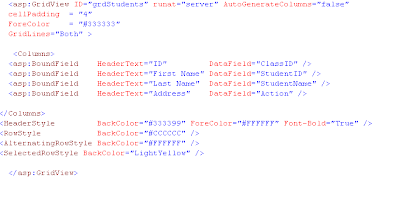
Now lets make the grid a bit preety by adding the following code in your default.aspx page:

just replace the grid view code with the following:


Now run the application and see the new look of the grid.

Thus now you can code any three tier web or desktop applicaion in .net.


Read more!

Sunday, August 24, 2008

How to insert record in SQL server database from VB.Net?

First go to following link
Secure connection and easy transaction handling in .Net

to understand the logic for the connection
and to get the idea of what objDB means.

Just create a objDB class from the above link provided and use the following code
to insert a record in the table named dog.

Private Sub cmdSave_Click(ByVal sender As System.Object, ByVal e As System.EventArgs) Handles cmdSingle.Click
Dim str As String
Dim objDB As clsObjDB

Try
objDB = New clsObjDB
str = "insert into Dog (DogName,Active)values('Lika',1) "


objDB.ExecuteQuery(str)
objDB = Nothing

messagebox.Show("Successfully Inserted Single row in dog!!" & vbCrLf)

Catch ex As Exception
Messagebox.show(ex.ToString())

objDB = Nothing
End Try

End Sub

In the above function I have just created a new instance of clsObjDB andpassed the sql query in the ExecuteQuery function and that's it, it does the rest of the work.


Read more!

Wednesday, August 20, 2008

Blog for Programmers (Prateek Regmi): How to get data from the Database using dataset in .Net

Blog for Programmers (Prateek Regmi): How to get data from the Database using dataset in .Net


Read more!

Monday, August 18, 2008

How to get data from the Database using dataset in .Net

First go to following link
Secure connection and easy transaction handling in .Net

to understand the logic for the connection
and to get the idea of what objDB.getDataSet means.

Then use the following function to get the values from the table named Books:


Private Function GetBooks() As Boolean
Dim strSql As String
Dim ds As DataSet

dim objBook as clsBook()

Try
strSql = "SELECT * from Books"

ds = objDB.getDataset(strSql)
If ds.Tables(0).Rows.Count > 0 Then
For Each row As DataRow In ds.Tables(0).Rows
objBook = new clsBook()

objBook.BookID = row("BookingID")
ObjBook.BookName = row ("BookName")
'etc

Next
GetBooks=true
Else

GetBooks = False
End If
Catch ex As Exception

Throw ex
End Try
End Function


Read more!

Thursday, August 7, 2008

How to find duplicate records in a Table (SQL Query)

Books table might have multiple bookKey. So to find out duplicate rows in a table which has thousands of rows can be tricky.

So the following query gets the duplicate records from the table and displays it and if you just want the count then you can use only the internal select statement only.

select b.* from (select bookkey, count(bookkey)as dup from Books where bookkey>0 group by bookkey) a,
books b where b.bookkey = a.bookkey and a.dup >1 order by b.bookkey

select b.* from (select bookkey from books group by bookkey having count(bookkey)>1) a,
books b where b.bookkey = a.bookkey order by b.bookkey


Read more!

Monday, August 4, 2008

Secure database connection and easy transaction handling in .Net Applications

Check out the full code for database connections, also learn steps on how to read an ini file from vb net, asp net applications  where you can store your database settings like datasource, username, password etc . 

This is very easy but very essential and convenient way of connecting the VB .net application to the SQL server database and handling the transactions.

Also simple execute and returning dataset functions are very helpful for any application development.

Required is the DBConfig.ini file where you can store your database information and keep it safe.

[DBConnection]
DataSource= 10.10.10.10
DBaseName= Data
UserID= sa
Password= sa

Please check out the following functions:

Public Const strDBConfFile = "C:\DBconfig.ini"

Imports System.Data.SqlClient

Public Class clsDBObj

Dim conn As SqlConnection
Dim cmd As SqlCommand
Dim isTran As Boolean
Private trans As SqlTransaction
Dim connStr As String

' Just connect
Public Function Connect() As Boolean

Dim bln As Boolean
Try
If conn Is Nothing Then
bln = ReadDatabseConfig(strDBConfFile)
If bln = True Then
conn = New SqlConnection(connStr)
Else
MessageBox.Show("There is no Configuration file or Error in Config File!! Please Check")
End If
End If
If conn.State = ConnectionState.Closed Then
conn.Open()
End If

Exit Function

Catch ex As Exception
MessageBox.Show("Cannot connect to the database")

End Try

End Function

Public Sub BeginTransaction()

If isTran Then Return
If conn.State = ConnectionState.Closed Then
conn.Open()
End If
trans = conn.BeginTransaction()
isTran = True
End Sub

Public Sub CommitTransaction()

If Not isTran Then Return
trans.Commit()
conn.close()
trans = Nothing
isTran = False
End Sub

Public Sub RollBackTransaction()
If Not isTran Then Return
trans.Rollback()
conn.close()
trans = Nothing
isTran = False
End Sub

Public Sub CloseConn()
If Not conn Is Nothing Then
If Not conn.State = ConnectionState.Closed Then

conn.Close()
End If
End If
End Sub

Public Function ExecuteQuery(ByVal strCmdTxt As String) As Boolean
Dim intRows As Integer
Try

If conn.State.Closed = ConnectionState.Closed Then
Connect()
End If

cmd = New SqlCommand
cmd.Connection = conn
cmd.CommandText = strCmdTxt
cmd.CommandType = CommandType.Text

If Not isTran Then
intRows = cmd.ExecuteNonQuery()
conn.close()
Else
cmd.Transaction = trans
intRows = cmd.ExecuteNonQuery()
End If

If intRows> 0 Then
ExecuteQuery = True
Else
ExecuteQuery = False
End If

Catch ex As Exception
Throw ex
End Try

End Function

Public Function ExecuteAndGetID(ByVal strCmdTxt As String) As String
Try
If conn.State.Closed = ConnectionState.Closed Then
Connect()
End If
strCmdTxt = strCmdTxt & " ; select scope_Identity();"
cmd = New SqlCommand
cmd.Connection = conn
cmd.CommandText = strCmdTxt
cmd.CommandType = CommandType.Text

If Not isTran Then
ExecuteAndGetID = CStr(cmd.ExecuteScalar())
conn.close()
Else
cmd.Transaction = trans
ExecuteAndGetID = CStr(cmd.ExecuteScalar())
End If

Catch ex As Exception
Throw ex
End Try
End Function

Public Function getDataset(ByVal strCmdTxt As String) As DataSet
Dim da As SqlDataAdapter = New SqlDataAdapter
Dim ds As DataSet = New DataSet

Try
If conn.State = ConnectionState.Closed Then

Connect()
End If

cmd = New SqlCommand
cmd.Connection = conn
cmd.CommandText = strCmdTxt
cmd.CommandType = CommandType.Text
If isTran Then
cmd.Transaction = trans
End If
da.SelectCommand = cmd
da.Fill(ds)

If Not isTran Then
conn.Close()
End If

Return ds

Catch ex As Exception
Throw ex

End Try

End Function

Public Sub New()
If Not Connect() Then
Exit Sub
End If
End Sub

Public Function ReadDatabseConfig(ByVal filename As String) As Boolean

Dim result As Boolean
Dim strDataSource As String
Dim strInitialCatalog As String
Dim strUserID As String
Dim strPassword As String
Dim str
Try

Dim sr As New IO.StreamReader(filename)
Dim ln As String = sr.ReadLine
While IsNothing(ln) = False
If ln.StartsWith("DataSource") = True Then
strDataSource = getConfigValue(ln)
ElseIf ln.StartsWith("DBaseName") = True Then
strInitialCatalog = getConfigValue(ln)
ElseIf ln.StartsWith("UserID") Then
strUserID = getConfigValue(ln)
ElseIf ln.StartsWith("Password") = True Then
strPassword = getConfigValue(ln)

End If
ln = sr.ReadLine
End While
sr.Close()
connStr = "Data Source=" & strDataSource & ";" & "Initial Catalog=" & strInitialCatalog & _
";User ID=" & strUserID & ";Password=" & strPassword
result = True
ReadDatabseConfig = result
Catch ex As Exception
result = False
End Try

Return result
End Function

Public Function getConfigValue(ByVal line As String) As String
Dim values() As String = Split(line, "=")
Dim reply As String = values(1).Trim
'txtactionlog.text = WriteLine("Value = {0}", reply)
Return reply
End Function

End Class


Read more!

Tuesday, July 22, 2008

Search a specific column in Sql Server Database

To find a specific column in a huge database system is pretty hectic and you miss out the column
at all sometimes and later decide to give it up or trapped in some hectic process. Therefore to get a better solution to this just try this query and it will show you the tables where to look at for that specific column:


SELECT name FROM sysobjects WHERE id IN ( SELECT id FROM syscolumns WHERE name = 'ColumnName' )


Read more!

Tuesday, July 1, 2008

Download Sql Server Interview Questions

Facing an interview is a bit out of normal. We can't explain things in words, but we know how to do it. Also the interview questions can be trikier but only little bit of knowledge prior to the interview might help.

I found these interview questions and answers might be helpful to you?

Download the questions from the following link provided:
http://prateek.regmi.googlepages.com/sqlinterview.pdf


Read more!

Tuesday, March 18, 2008

Inserting Multiple Rows in one Insert Statement in SQLServer

METHOD 1:

INSERT INTO YourTable (FirstCol, SecondCol)
VALUES (’First’ , 1) , (’Second’ , 2) , (’Third’ , ‘3′), (’Fourth’ , ‘4′) (’and so on’) ;

METHOD 2:

Use YourDB
GO
INSERT INTO MyTable (FirstCol, SecondCol)
SELECT 'First' ,1
UNION ALL
SELECT 'Second' ,2
UNION ALL
SELECT 'Third' ,3
UNION ALL
SELECT 'Fourth' ,4
UNION ALL
SELECT 'Fifth' ,5
GO

METHOD 3:

Insert into yourtable (table1col, table2col)
Select table1col, table2col
From table1 inner join table2 on table1.table1col = table2.table2col


Read more!

Thursday, March 13, 2008

To execute stored Procedure from vb 6.0

This article provides the code and detail information on how to insert data in the sql server database from visual basic 6.0.
The code provided below helps to execute stored procedure written in sql server database.

'To update the data in the database

Dim cmd as ADODB.Command

Dim res As Integer

Set cmd = New ADODB.Command
cmd.ActiveConnection = con ' use your active connection
cmd.CommandType = adCmdStoredProc
cmd.CommandText = "update_empdetails" ' This is the name of stored Procedure

cmd.Parameters.Append cmd.CreateParameter("empid", adVarChar, adParamInput, 6,txt_empid.Text)
cmd.Parameters.Append cmd.CreateParameter("firstname", adVarChar, adParamInput, 30, txt_firstname.Text)
cmd.Parameters.Append cmd.CreateParameter("title", adVarChar, adParamInput, 30, txt_title.Text)
cmd.Parameters.Append cmd.CreateParameter("address", adVarChar, adParamInput, 100, txt_address.Text)
cmd.Parameters.Append cmd.CreateParameter("result", adInteger, adParamOutput)
cmd.Execute

res = cmd("result")

If (res = 1) Then
MsgBox "Updated Successfully"
End If

Set cmd.ActiveConnection = Nothing

' To retrive data from database

Private Sub cmd_get_Click()

str_empid = txt_empid.Text

Set cmd = New ADODB.Command
cmd.ActiveConnection = con
cmd.CommandType = adCmdStoredProc
cmd.CommandText = "empdetails"

cmd.Parameters.Append cmd.CreateParameter("empid", adVarChar, adParamInput, 6, str_empid)

Set rs = cmd.Execute
' if you want use rs.recordcount you can use below code
' or rs.Open cmd, con, adOpenStatic

If Not rs.EOF Then
txt_firstname = rs.Fields(0)
txt_title = rs.Fields(1)
txt_address = rs.Fields(2)
End If

Set cmd.ActiveConnection = Nothing

End Sub


Read more!

Procedure to insert XML Data in Sql Server Database using OPEN XML

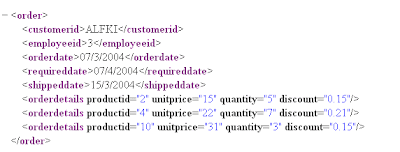
Xml file is:


"The Procedure is

CREATE PROCEDURE xmlOrderInsert @order ntext AS
DECLARE @docHandle int, @OID int

EXEC sp_xml_preparedocument @docHandle OUTPUT, @order

--sp_xml_preparedocument makes xml document ready to read
-- @Order holds the xml data eg . set @order='....'


BEGIN TRANSACTION

INSERT INTO Orders( CustomerID, EmployeeID, OrderDate, RequiredDate )
SELECT CustomerID, EmployeeID, OrderDate, RequiredDate
FROM Openxml( @docHandle, '/Order', 3) WITH ( CustomerID nchar(5),
EmployeeID int, OrderDate datetime, RequiredDate datetime )

IF @@ERROR<>0 BEGIN ROLLBACK TRANSACTION RETURN -100 END
SET @OID = SCOPE_IDENTITY()
INSERT INTO [Order Details] ( OrderID, ProductID, UnitPrice, Quantity, Discount )
SELECT @OID AS [PO ID], ProductID, UnitPrice, Quantity, Discount
FROM OpenXml( @docHandle, '/Order/OrderDetails', 1) WITH
( ProductID int, UnitPrice money, Quantity smallint, Discount real )
IF @@ERROR<>0 BEGIN ROLLBACK TRANSACTION RETURN -101 END
COMMIT TRANSACTION
EXEC sp_xml_removedocument @docHandle SELECT @OID AS [Order ID]
GO


' to execute the procedure

exec xmlOrderInsert
@Order='.. '

' this should insert the correct data
'Thanks


Read more!