Recent Posts

Showing posts with label XML. Show all posts

Sunday, January 23, 2011

How to remove xmlns namespace from xml using vb.net

I was having issues with xmlns in xml file and was creating unnecessary waste of time handling them. But i found below solution to remove xmlns from the xml file so that I can focus on only the required tags.

Private
Function stripDocumentNamespace(oldDom As XmlDocument) As XmlDocument
' Remove all xmlns:* instances from the passed XmlDocument
' to simplify our xpath expressions.
Dim newDom As New XmlDocument()
newDom.LoadXml(System.Text.RegularExpressions.Regex.Replace(oldDom.OuterXml, "(xmlns:?[^=]*=[""][^""]*[""])", "", System.Text.RegularExpressions.RegexOptions.IgnoreCase Or System.Text.RegularExpressions.RegexOptions.Multiline))
Return newDom
End Function


Read more!
Sunday, December 7, 2008

Learn how to read a xml file from vb.Net application with full source code.

This small article will show you how to read the xml file for processing from the vb.net application. This can be very useful for Desktop or Asp.net application to process the xml files and for the beginners who will be willing to work with the web services and xslt.

Check the following steps to find out how to load and read a xml file:

1. Open an application in vb.net. 

2. Place a command button on the form.

3. on the command click write the following code.

 Dim myXMLdoc As New Xml.XmlDataDocument

Dim strFileName As String
            Dim strText As String

'Provide the path of the XML 
            strFileName = "C:test1.xml"
            

            Dim oFile As System.IO.File
            Dim oRead As System.IO.StreamReader

'Read the file from the provided path
            oRead = oFile.OpenText(strFileName)
            strText = oRead.ReadToEnd()

 'Selects the XML Text
        myXMLdoc.LoadXml(strText)
        Dim xnr As Xml.XmlNodeReader
        Dim xn As Xml.XmlNode
        Dim xe As Xml.XmlElement = myXMLdoc.DocumentElement

 'Selects the Single Node
        xn = myXMLdoc.SelectSingleNode("/Data/Name")
        If IsNothing(xn) = False Then
            xnr = New Xml.XmlNodeReader(xn)
            While xnr.Read
                If Not (xnr.Value = "") Then
                    Me.txtLatitude = xnr.Value
                End If
            End While
            xnr.Close()
        End If


Read more!

Thursday, July 31, 2008

XML with C#/.NET 2.0 and XPathNavigator

I had a bit tricky kind of xml shown as follows:

data
customer
id1/id
fullname John Smith /fullname
/customer
custaddress
streetname 100 George St /streetname
suburb Sydney /suburb
/custaddress
customer
id 2 /id
fullname Paul Smith /fullname
/customer
customer
id 3 /id
fullname Mary Smith /fullname
/customer
custaddress
streetname 100 George St /streetname
suburb Sydney /suburb
/custaddress
/data

(Note: I have removed "<" and ">" in the xml data because this blogger is giving me funny results while posting i don't want to go through it now)


Here customerAddress lies outside the customer tag and it exists only to those cutomers who has address.
Now to find which customer is related to what address it was a bit of a trick so I posted my query in msdn forum and found the following answer which worked quiet well for me

Guys facing the same or similar problems can solve this in the following way:

foreach (XPathNavigator customer in new XPathDocument(@"..\..\XMLFile1.xml").CreateNavigator().Select("data/Customer"))
{
Console.WriteLine("Id: {0}, full name: {1}", customer.SelectSingleNode("ID").Value, customer.SelectSingleNode("FullName").Value);
XPathNavigator address = customer.SelectSingleNode("following-sibling::*[1][self::CustAddress]");
if (address != null)
{
Console.WriteLine("Address: {0}, {1}", address.SelectSingleNode("StreetName").Value, address.SelectSingleNode("Suburb").Value);
}
else
{
Console.WriteLine("No address found.");
}
Console.WriteLine();
}


Read more!

Thursday, March 13, 2008

Procedure to insert XML Data in Sql Server Database using OPEN XML

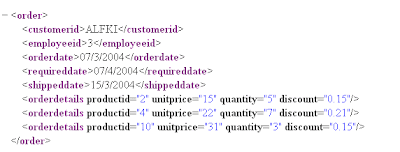
Xml file is:


"The Procedure is

CREATE PROCEDURE xmlOrderInsert @order ntext AS
DECLARE @docHandle int, @OID int

EXEC sp_xml_preparedocument @docHandle OUTPUT, @order

--sp_xml_preparedocument makes xml document ready to read
-- @Order holds the xml data eg . set @order='....'


BEGIN TRANSACTION

INSERT INTO Orders( CustomerID, EmployeeID, OrderDate, RequiredDate )
SELECT CustomerID, EmployeeID, OrderDate, RequiredDate
FROM Openxml( @docHandle, '/Order', 3) WITH ( CustomerID nchar(5),
EmployeeID int, OrderDate datetime, RequiredDate datetime )

IF @@ERROR<>0 BEGIN ROLLBACK TRANSACTION RETURN -100 END
SET @OID = SCOPE_IDENTITY()
INSERT INTO [Order Details] ( OrderID, ProductID, UnitPrice, Quantity, Discount )
SELECT @OID AS [PO ID], ProductID, UnitPrice, Quantity, Discount
FROM OpenXml( @docHandle, '/Order/OrderDetails', 1) WITH
( ProductID int, UnitPrice money, Quantity smallint, Discount real )
IF @@ERROR<>0 BEGIN ROLLBACK TRANSACTION RETURN -101 END
COMMIT TRANSACTION
EXEC sp_xml_removedocument @docHandle SELECT @OID AS [Order ID]
GO


' to execute the procedure

exec xmlOrderInsert
@Order='.. '

' this should insert the correct data
'Thanks


Read more!

Wednesday, March 12, 2008

Get xml Data and use for insert in vb 6.0

Dim xDoc As MSXML2.DOMDocument
Set xDoc = New MSXML2.DOMDocument
Dim strData As String

If xDoc.Load("C:\test.xml") Then
' The document loaded successfully.
' Now do something intersting.
strData = xDoc.xml
MsgBox strData

' Now strData can be used anywhere to insert data in Database
' or to manupulate the xml data
Else
' The document failed to load.
End If
Set xDoc = Nothing


Read more!