Recent Posts

Sunday, March 16, 2008

Read Write and lock Usb disk Drive Sectors in C#

using System;
using System.Diagnostics;
using System.Collections;
using System.Runtime.InteropServices;

namespace PCSUSBCSharp
{
public class PCSUSBCSharp
{

public enum EMoveMethod : uint
{
Begin = 0,
Current = 1,
End = 2
}

[DllImport("kernel32.dll", SetLastError = true)]
static extern int CloseHandle(IntPtr hObject);

const uint FILE_SHARE_READ = 0x00000001;
const uint FILE_SHARE_WRITE = 0x00000002;
const uint FILE_SHARE_DELETE = 0x00000004;
const uint OPEN_EXISTING = 3;

const uint GENERIC_READ = (0x80000000);
const uint GENERIC_WRITE = (0x40000000);

const uint FILE_FLAG_NO_BUFFERING = 0x20000000;
const uint FILE_READ_ATTRIBUTES = (0x0080);
const uint FILE_WRITE_ATTRIBUTES = 0x0100;
const uint ERROR_INSUFFICIENT_BUFFER = 122;
const uint FILE_BEGIN=0;


private const Int32 INVALID_HANDLE_VALUE = -1;
//s
private const Int32 FILE_ATTRIBUTE_NORMAL=1;

[DllImport("kernel32.dll", SetLastError = true)]
private static extern bool WriteFile(IntPtr handle,
byte[] buffer, ushort count, ref ushort written, IntPtr lpOverlapped);


[DllImport("kernel32.dll", SetLastError = true)]
private static extern bool ReadFile(IntPtr handle,
byte[] buffer, ushort toRead, ref ushort read, IntPtr lpOverLapped);

[DllImport("Kernel32.dll", SetLastError = true, CharSet = CharSet.Auto)]
static extern uint SetFilePointer(
IntPtr hFile,
int lDistanceToMove,
int lpDistanceToMoveHigh,
EMoveMethod dwMoveMethod);


[DllImport("kernel32.dll", SetLastError = true)]
static extern IntPtr CreateFile(
string lpFileName,
uint dwDesiredAccess,
uint dwShareMode,
IntPtr lpSecurityAttributes,
uint dwCreationDisposition,
uint dwFlagsAndAttributes,
IntPtr hTemplateFile);


static private IntPtr OpenVolume(string DeviceName)
{
IntPtr hDevice;
hDevice = CreateFile(
@"\\.\" + DeviceName,
GENERIC_READ | GENERIC_WRITE,
FILE_SHARE_WRITE,
IntPtr.Zero,
OPEN_EXISTING,
0,
IntPtr.Zero);
if ((int)hDevice == -1)
{
throw new Exception(Marshal.GetLastWin32Error().ToString());
}
return hDevice;
}


static private IntPtr OpenFile(string path)
{
IntPtr hFile;
hFile = CreateFile(
path,
FILE_READ_ATTRIBUTES | FILE_WRITE_ATTRIBUTES,
FILE_SHARE_READ | FILE_SHARE_WRITE,
IntPtr.Zero,
OPEN_EXISTING,
0,
IntPtr.Zero);
if ((int)hFile == -1)
{
throw new Exception(Marshal.GetLastWin32Error().ToString());
}
return hFile;
}


public static bool b9xME;
public static IntPtr hUSBDisk;


public static bool IsUSBOpen()
{
//return (hUSBDisk?true:false);
return (int)(hUSBDisk)!=-1;
}


private static IntPtr OpenUSBDisk(String fileName)
{
if(IsUSBOpen())
return hUSBDisk;
else
{
IntPtr tmpHandle;
tmpHandle=OpenVolume(fileName);
if((int)tmpHandle==-1)
return new IntPtr(-1);
else
return tmpHandle;
}

}


private static void CloseUSBDisk()
{


if((int)hUSBDisk!=-1)
{

CloseHandle(hUSBDisk);
hUSBDisk=new IntPtr(-1);
}
}


public static void ResetDisk(String fileName)
{

if(IsUSBOpen())
CloseUSBDisk();
hUSBDisk=OpenUSBDisk(fileName);
CloseUSBDisk();

}


public static int WriteUSBDisk(byte []buffer, ushort cylinder, ushort sector,ushort head,String fileName)
{
ushort count=0;
bool retValue;
if(!IsUSBOpen())
hUSBDisk=OpenUSBDisk(fileName);
if((int)hUSBDisk==-1)
return NISH_ERROR;
SetFilePointer(hUSBDisk,
512*(18*(cylinder*2+head)+(sector-1)),0,
EMoveMethod.Begin);
retValue=WriteFile(hUSBDisk,buffer, 512,ref count,IntPtr.Zero);
if(retValue)
return NISH_NO_ERROR;
else
return NISH_ERROR;
}


public static int ReadUSBDisk(byte []buffer, ushort cylinder, ushort sector,ushort head,String fileName)
{
ushort count=1;
bool retValue;
if(!IsUSBOpen())
hUSBDisk=OpenUSBDisk(fileName);
if((int)hUSBDisk==-1)
return NISH_ERROR;
SetFilePointer(hUSBDisk,
512*(18*(cylinder*2+head)+(sector-1)),0,
EMoveMethod.Begin);
retValue=ReadFile(hUSBDisk,buffer,512,ref count,IntPtr.Zero);


if(retValue)
return NISH_NO_ERROR;
else
return NISH_ERROR;

}
static int NISH_NO_ERROR=1;
static int NISH_ERROR=0;


}


}


Read more!
Read Write and lock Usb disk Drive Sectors in C#

using System;
using System.Diagnostics;
using System.Collections;
using System.Runtime.InteropServices;

namespace PCSUSBCSharp
{
public class PCSUSBCSharp
{

public enum EMoveMethod : uint
{
Begin = 0,
Current = 1,
End = 2
}

[DllImport("kernel32.dll", SetLastError = true)]
static extern int CloseHandle(IntPtr hObject);

const uint FILE_SHARE_READ = 0x00000001;
const uint FILE_SHARE_WRITE = 0x00000002;
const uint FILE_SHARE_DELETE = 0x00000004;
const uint OPEN_EXISTING = 3;

const uint GENERIC_READ = (0x80000000);
const uint GENERIC_WRITE = (0x40000000);

const uint FILE_FLAG_NO_BUFFERING = 0x20000000;
const uint FILE_READ_ATTRIBUTES = (0x0080);
const uint FILE_WRITE_ATTRIBUTES = 0x0100;
const uint ERROR_INSUFFICIENT_BUFFER = 122;
const uint FILE_BEGIN=0;


private const Int32 INVALID_HANDLE_VALUE = -1;
//s
private const Int32 FILE_ATTRIBUTE_NORMAL=1;

[DllImport("kernel32.dll", SetLastError = true)]
private static extern bool WriteFile(IntPtr handle,
byte[] buffer, ushort count, ref ushort written, IntPtr lpOverlapped);


[DllImport("kernel32.dll", SetLastError = true)]
private static extern bool ReadFile(IntPtr handle,
byte[] buffer, ushort toRead, ref ushort read, IntPtr lpOverLapped);

[DllImport("Kernel32.dll", SetLastError = true, CharSet = CharSet.Auto)]
static extern uint SetFilePointer(
IntPtr hFile,
int lDistanceToMove,
int lpDistanceToMoveHigh,
EMoveMethod dwMoveMethod);


[DllImport("kernel32.dll", SetLastError = true)]
static extern IntPtr CreateFile(
string lpFileName,
uint dwDesiredAccess,
uint dwShareMode,
IntPtr lpSecurityAttributes,
uint dwCreationDisposition,
uint dwFlagsAndAttributes,
IntPtr hTemplateFile);


static private IntPtr OpenVolume(string DeviceName)
{
IntPtr hDevice;
hDevice = CreateFile(
@"\\.\" + DeviceName,
GENERIC_READ | GENERIC_WRITE,
FILE_SHARE_WRITE,
IntPtr.Zero,
OPEN_EXISTING,
0,
IntPtr.Zero);
if ((int)hDevice == -1)
{
throw new Exception(Marshal.GetLastWin32Error().ToString());
}
return hDevice;
}


static private IntPtr OpenFile(string path)
{
IntPtr hFile;
hFile = CreateFile(
path,
FILE_READ_ATTRIBUTES | FILE_WRITE_ATTRIBUTES,
FILE_SHARE_READ | FILE_SHARE_WRITE,
IntPtr.Zero,
OPEN_EXISTING,
0,
IntPtr.Zero);
if ((int)hFile == -1)
{
throw new Exception(Marshal.GetLastWin32Error().ToString());
}
return hFile;
}


public static bool b9xME;
public static IntPtr hUSBDisk;


public static bool IsUSBOpen()
{
//return (hUSBDisk?true:false);
return (int)(hUSBDisk)!=-1;
}


private static IntPtr OpenUSBDisk(String fileName)
{
if(IsUSBOpen())
return hUSBDisk;
else
{
IntPtr tmpHandle;
tmpHandle=OpenVolume(fileName);
if((int)tmpHandle==-1)
return new IntPtr(-1);
else
return tmpHandle;
}

}


private static void CloseUSBDisk()
{


if((int)hUSBDisk!=-1)
{

CloseHandle(hUSBDisk);
hUSBDisk=new IntPtr(-1);
}
}


public static void ResetDisk(String fileName)
{

if(IsUSBOpen())
CloseUSBDisk();
hUSBDisk=OpenUSBDisk(fileName);
CloseUSBDisk();

}


public static int WriteUSBDisk(byte []buffer, ushort cylinder, ushort sector,ushort head,String fileName)
{
ushort count=0;
bool retValue;
if(!IsUSBOpen())
hUSBDisk=OpenUSBDisk(fileName);
if((int)hUSBDisk==-1)
return NISH_ERROR;
SetFilePointer(hUSBDisk,
512*(18*(cylinder*2+head)+(sector-1)),0,
EMoveMethod.Begin);
retValue=WriteFile(hUSBDisk,buffer, 512,ref count,IntPtr.Zero);
if(retValue)
return NISH_NO_ERROR;
else
return NISH_ERROR;
}


public static int ReadUSBDisk(byte []buffer, ushort cylinder, ushort sector,ushort head,String fileName)
{
ushort count=1;
bool retValue;
if(!IsUSBOpen())
hUSBDisk=OpenUSBDisk(fileName);
if((int)hUSBDisk==-1)
return NISH_ERROR;
SetFilePointer(hUSBDisk,
512*(18*(cylinder*2+head)+(sector-1)),0,
EMoveMethod.Begin);
retValue=ReadFile(hUSBDisk,buffer,512,ref count,IntPtr.Zero);


if(retValue)
return NISH_NO_ERROR;
else
return NISH_ERROR;

}
static int NISH_NO_ERROR=1;
static int NISH_ERROR=0;


}


}


Read more!

Friday, March 14, 2008

Display animated gif image in vb application

'This cannot be done directly by inserting an gif image in the form but we have to
'First Add Microsoft WebBrowser control in the Form

'First Add Microsoft WebBrowser control in the Form


'WebBrowser1.Navigate App.Path + "\Reports\down.htm"
' WebBrowser1.Navigate App.Path + "\images\downArrow1.gif"

' Unfortunately, the WebBrowser also displays a right-hand scroll
' bar--probably not what you want for a decorative image. Believe it
' or not, you can turn this scrollbar off just like you would normally
' via HTML, as in:
strPath = App.Path + "\images\downArrow1.gif"
WebBrowser1.Navigate "about:html body scroll='no'bgcolor='#CCFFFF' img src= " & strPath & " >/img body /html "

Note Below:
This error might give you a problem while doing above

File not found: 'C:\WINDOWS\system32\ieframe.dll\1'


Apparently they have separated the library and code for the browser out of
ieframe.dll in IE7 installed and you are still on IE6.
One suggestion is to changed the reference for "Microsoft Internet Controls" from
the ieframe.dll to shdocvw.dll in the project references (browse for it in the same
folder), saved the project, reopen it, and you no longer receive the errors.


Read more!

Thursday, March 13, 2008

To execute stored Procedure from vb 6.0

This article provides the code and detail information on how to insert data in the sql server database from visual basic 6.0.
The code provided below helps to execute stored procedure written in sql server database.

'To update the data in the database

Dim cmd as ADODB.Command

Dim res As Integer

Set cmd = New ADODB.Command
cmd.ActiveConnection = con ' use your active connection
cmd.CommandType = adCmdStoredProc
cmd.CommandText = "update_empdetails" ' This is the name of stored Procedure

cmd.Parameters.Append cmd.CreateParameter("empid", adVarChar, adParamInput, 6,txt_empid.Text)
cmd.Parameters.Append cmd.CreateParameter("firstname", adVarChar, adParamInput, 30, txt_firstname.Text)
cmd.Parameters.Append cmd.CreateParameter("title", adVarChar, adParamInput, 30, txt_title.Text)
cmd.Parameters.Append cmd.CreateParameter("address", adVarChar, adParamInput, 100, txt_address.Text)
cmd.Parameters.Append cmd.CreateParameter("result", adInteger, adParamOutput)
cmd.Execute

res = cmd("result")

If (res = 1) Then
MsgBox "Updated Successfully"
End If

Set cmd.ActiveConnection = Nothing

' To retrive data from database

Private Sub cmd_get_Click()

str_empid = txt_empid.Text

Set cmd = New ADODB.Command
cmd.ActiveConnection = con
cmd.CommandType = adCmdStoredProc
cmd.CommandText = "empdetails"

cmd.Parameters.Append cmd.CreateParameter("empid", adVarChar, adParamInput, 6, str_empid)

Set rs = cmd.Execute
' if you want use rs.recordcount you can use below code
' or rs.Open cmd, con, adOpenStatic

If Not rs.EOF Then
txt_firstname = rs.Fields(0)
txt_title = rs.Fields(1)
txt_address = rs.Fields(2)
End If

Set cmd.ActiveConnection = Nothing

End Sub


Read more!

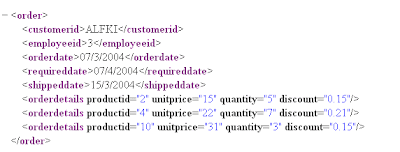
Procedure to insert XML Data in Sql Server Database using OPEN XML

Xml file is:


"The Procedure is

CREATE PROCEDURE xmlOrderInsert @order ntext AS
DECLARE @docHandle int, @OID int

EXEC sp_xml_preparedocument @docHandle OUTPUT, @order

--sp_xml_preparedocument makes xml document ready to read
-- @Order holds the xml data eg . set @order='....'


BEGIN TRANSACTION

INSERT INTO Orders( CustomerID, EmployeeID, OrderDate, RequiredDate )
SELECT CustomerID, EmployeeID, OrderDate, RequiredDate
FROM Openxml( @docHandle, '/Order', 3) WITH ( CustomerID nchar(5),
EmployeeID int, OrderDate datetime, RequiredDate datetime )

IF @@ERROR<>0 BEGIN ROLLBACK TRANSACTION RETURN -100 END
SET @OID = SCOPE_IDENTITY()
INSERT INTO [Order Details] ( OrderID, ProductID, UnitPrice, Quantity, Discount )
SELECT @OID AS [PO ID], ProductID, UnitPrice, Quantity, Discount
FROM OpenXml( @docHandle, '/Order/OrderDetails', 1) WITH
( ProductID int, UnitPrice money, Quantity smallint, Discount real )
IF @@ERROR<>0 BEGIN ROLLBACK TRANSACTION RETURN -101 END
COMMIT TRANSACTION
EXEC sp_xml_removedocument @docHandle SELECT @OID AS [Order ID]
GO


' to execute the procedure

exec xmlOrderInsert
@Order='.. '

' this should insert the correct data
'Thanks


Read more!