This is a very good asp net tutorial to address the issues of passing the values "to and from" a parent and child window in asp net 2.0.
In this asp net tutorial i have passed values from parent window to child window to tick check boxes and get values back from checkboxes from child and
pass it back in the text box in asp net gird view.
I got this working getting help from different websites and was hassle doing it.
So I thought of putting it together in one article so that it helps other programmers to save their time programming asp net 2.0 web sites.
I will explain my case:
I have a asp net 2.0 gridview where I bind the data from microsoft sql server 2005 database. In the grid I have a text box in one column and I have a button on column next to the text box column.
Now when I press the button then it has to pick the values from the textboxes delimited by some character, and open a new child window which has a grid populated from the database and has the check box. Now those check box has to be ticked reading the values passed from the textbox from the grid of the parent form.
Also when the user unticks the checkboxes or ticks additional checkboxes and closes the child form then it should pass back the checked values to the appropriate textbox on the grid of the parent form.
Ok Now lets Start the tutorial.
Here for this asp net 2.0 tutorial i have created two tables in my sql server database
Table Customers
Columns ID int
Name varchar(50)
Cars varchar(100)
Table Cars
Columns
CD varchar(10)
CarName varchar(100)Now in this application I will have a customer who has different cars and car CDs are recorded in column cars delemitated by "/".
This has to be done in some situations where you have no access to cars table.
Ok Now lests start a website in asp net 2.0 containing master and detail pages
(
Learn how to design Master Detail pages in asp net 2.0)
Add two web forms in the website, first is Default.aspx (parent form) and link it to the Master page. Similarly add another web form cars.aspx but don't link it to the master page as it will act as child window.
Now add the database classes to connect to the database
(
Learn how to connect to the database from asp net web site) and write the classes to retrieve the data from the customers table and Cars table from the database.
(
Learn how to retrieve data from the database)
In my case I have class DBObj for connection to the database and I have a class RetrieveData for retrieving the data where I have three functions
I am planning to use object as a datasource in this tutorial so I am returning objects from the functions below:
(
No clue about object data source in asp net 2.0 then Learn how to use object as data source in asp .net applications )
1.
Public Function GetCars(ByVal strCars As String)
As List(Of Cars) (returns list of cars)
2.
Public Function GetCustomers(ByVal strCars As String)
As List(Of Customer) (returns list of customers)
3.
Public Function CheckCars(ByVal CD As String, ByVal strCars As String)
As Boolean (checks if the car has to be ticked or not)
In Cars object I have a property called checked that determines if the car is in the customer list or not. So this function determines if this property has to be set true or not by getting stringCars as input.
I have added a Java script file in the Default.aspx page called Test.js
Now Lets bind a asp net 2.0 grid view named gvCustomers in Default.aspx page and asp.net grid view named gvCars in Cars page.
My Default.aspx page has a asp net 2.0 gridview with following columns :
ID, Customer Name,
Customer Cars (Text Box Field which is bound to CustCars field),
cmdCar (Command button to open up the Cars Window), Note: And on cmdCar Under OnClientClick I have called a Java Script Function called openPage(this);
My default.aspx code looks like below:
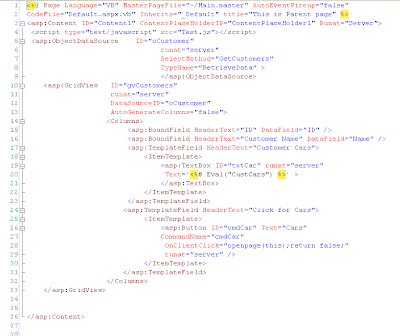
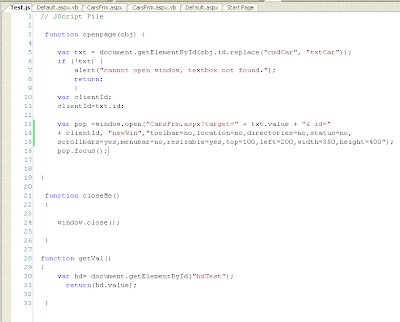
And my Test.js has the following code:
Similarly my CarsFrm.aspx has a asp net 2.0 gridview with following columns:
CD
CarName
chkOk (Check box which can be selected by user)
And it has a command button called cmdOk
My CarsFrm.aspx code looks like the following:
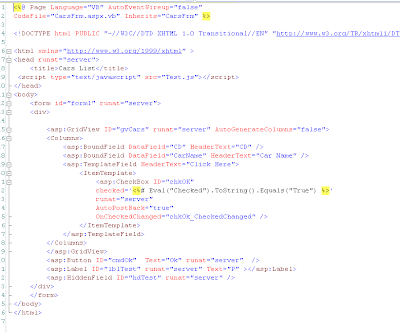
Now when you run the application then you are able to see the gridview with data and command button and when the command button is pressed a new window for cars opens up. Now lets transfer data "to and from" Cars page.
Now here I will explain step by step which makes it easier to understand:
Step 1 . On Default.aspx in grid gvCustomers cmdCar put the following code:
OnClientClick="openpage(this);return false;"
Step 2. openpage(obj) on the java script will be called where it will open up cars.aspx page.
Also sends the data from adjacent text box to the cars page.
step 3. put a hidden field "hdTest" in cars.aspx
asp:HiddenField ID="hdTest" runat="server"
and one label to test the hidden field is working or not and name it "lblTest"
Step 4. in cars page load retrieve the data arrived with following code
strCars = Request.QueryString("target")
and bind the grid
gvCars.DataSource = obj.GetCars(strCars)
gvCars.DataBind()
GetCars retrives all the cars from the table and checks the ones that are on the string strCars
Step 5. Now in cars.aspx page you need to set the databinder for checked as follows
asp:CheckBox ID="chkOK" checked=''
and on gvCars_DataBound put the following code to see if the code is passed ok :
For Each gvr As GridViewRow In gvCars.Rows
Dim cb As CheckBox = CType(gvr.FindControl("chkOK"), CheckBox)
If cb.Checked = True Then
strCarCode = strCarCode.Trim() & "/" & gvr.Cells(0).Text.Trim()
End If
Next
If strCarCode.Length > 0 Then
hdTest.Value = strCarCode.Substring(1, strCarCode.Length - 1)
lblTest.Text = strCarCode.Substring(1, strCarCode.Length - 1)
End If
(Now try to run the application and enter the car code in the text box now you can see the checkbox checked in cars Grid)
Step 6. Now in Default.aspx register a javascript function called update to update the textbox in the grid.
like folows
scr = ""
' register the javascript into the Page
ClientScript.RegisterClientScriptBlock(Me.GetType, "update", scr)
Step 7. similarly in cars.aspx page register a function to send it to Default.aspx page
like follows:
strTextId = Request.QueryString(1)
scr = ""
ClientScript.RegisterClientScriptBlock(Me.GetType, "done(fName,strId)", scr)
and
cmdOk.OnClientClick = "Done('" & str & "','" & strTextId & "')"
Step 8. Now we are ready to send the data to the main form from the child form in asp .net website.
Now we have to get the data and put it in correct format and send it to the main form:
in cars.aspx page just assign the event to check box as OnCheckedChanged="chkOk_CheckedChanged"
and write the following code to get the value of the checkbox and format the data:
Dim chkbox As CheckBox
Dim strText As String = ""
chkbox = CType(sender, CheckBox)
Dim row As GridViewRow = CType(chkbox.NamingContainer, GridViewRow)
strText = hdTest.Value
If chkbox.Checked = True Then
If strText = "" Then
strText = strText & row.Cells(0).Text.Trim
Else
strText = strText & "/" & row.Cells(0).Text.Trim
End If
Else
If InStr(strText, "/") > 0 Then
strText = strText.Replace("/" & row.Cells(0).Text.Trim, "")
strText = strText.Replace(row.Cells(0).Text.Trim & "/", "")
Else
strText = strText.Replace(row.Cells(0).Text.Trim, "")
End If
End If
hdTest.Value = strText
lblTest.Text = hdTest.Value
End SubNote : remember to do AutoPostBack="true" for checkbox so that the hidden field is written at the time when we check the box
The checkbox in Cars page will look like follows:
asp:CheckBox ID="chkOK"
checked=''
runat="server"
AutoPostBack="true"
OnCheckedChanged="chkOk_CheckedChanged" /
Now run the website it should be passing data to and from the parent and child forms.
Download Full surce code for "
How to open a child window on row command, pass value to child window and return values to parent form in asp.net 2.0?"
Read more!


 Posts
Posts


